Quick start: API key, REST and MCP
From an API key to a first POST /v1/landed-cost request and a calculate_landed_cost call from Claude Desktop.
In 10 minutes you will create a key, calculate a car's turnkey cost over REST and call the same calculation from Claude Desktop over MCP.
What you need
- A company owner account in Desk (only the owner can create keys).
- For step 3: Claude Desktop and Node.js (for
npx). - The API base address. Production:
https://api.importos.appWaiting on the owner (a placeholder domain until the owner decides). Locally:http://127.0.0.1:4114.
Create an API key
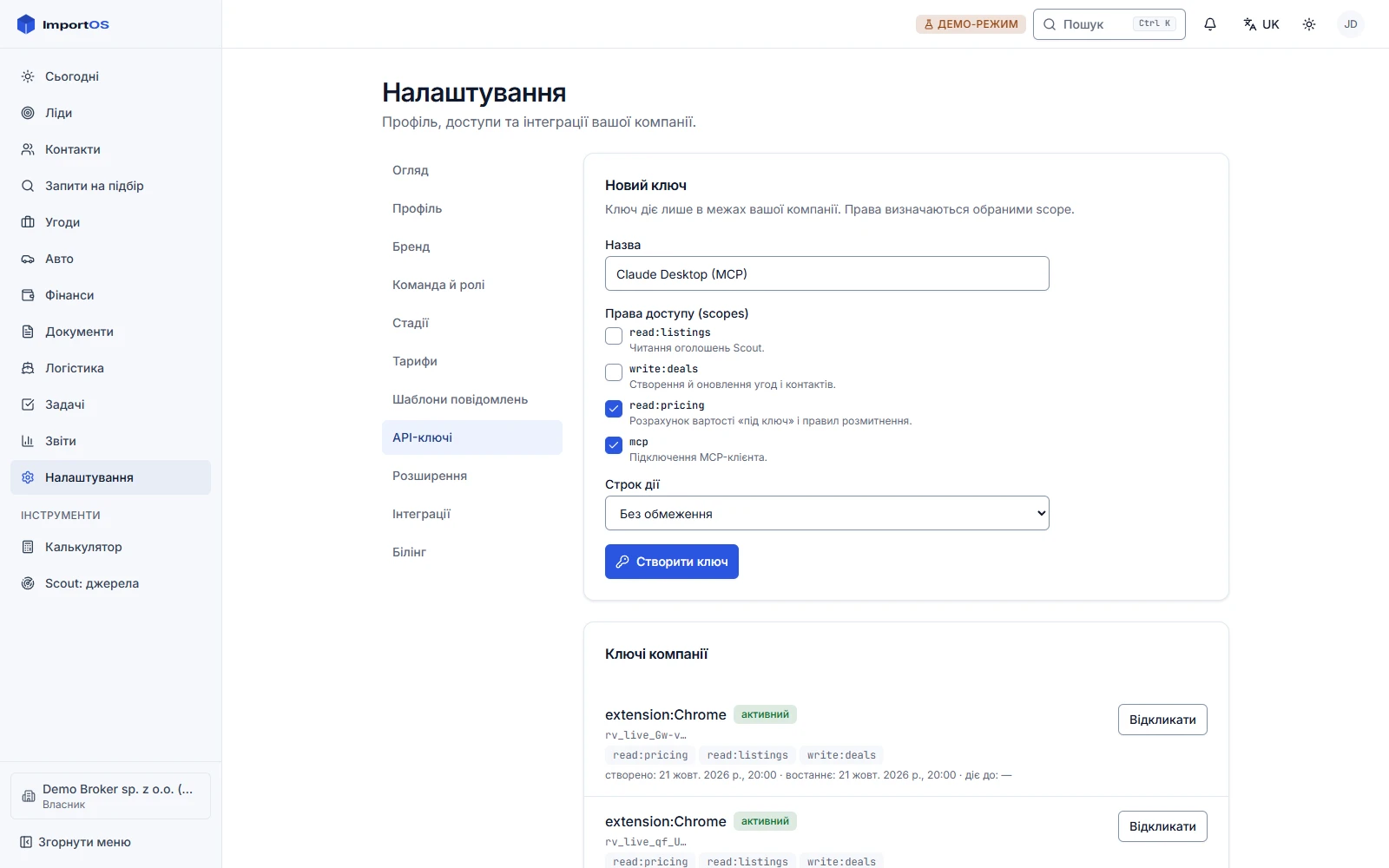
- Sign in to Desk and open Settings → API keys.
- Name:
quickstart. Scopes:read:pricingandmcp(addread:listingsfor listing search and VIN). - Press "Create key" and copy it immediately: the key looks like
rv_live_…and is shown once.
Keep the key in an environment variable, not in code:
export IMPORTOS_API_KEY="rv_live_..."
export IMPORTOS_API="https://api.importos.app" # locally: http://127.0.0.1:4114$env:IMPORTOS_API_KEY = "rv_live_..."
$env:IMPORTOS_API = "https://api.importos.app"Local development without Desk
If you run the API yourself (pnpm --filter @importos/api start), a key can be created with a script as the
schema owner: pnpm --filter @importos/api key:create --tenant vezemo --name local --scopes read:pricing,read:listings,mcp. The key is printed once.
The first request: POST /v1/landed-cost
The method is POST
The calculation takes a complex JSON body, so the endpoint works only via POST. GET /v1/landed-cost does
not exist. GET is used by the simple endpoints: market-price, vin, listings/search, rules, fx.
Let us calculate a 2018 Toyota Camry (2.5 L, petrol) from Copart, Trenton (NJ) yard, a $8000 bid, delivery to Kyiv, our fee $700:
curl -s "$IMPORTOS_API/v1/landed-cost" \
  -H "Authorization: Bearer $IMPORTOS_API_KEY" \
  -H "Content-Type: application/json" \
  -d '{
    "lot_price": 8000,
    "auction": "copart",
    "vehicle": { "vin": "4T1B11HK5JU000001", "year": 2018, "fuel": "petrol", "engine_cc": 2487, "damage": "FRONT END" },
    "from": { "auction_yard": "NJ - TRENTON" },
    "to": { "country": "UA", "city": "Київ" },
    "fee_model": { "model": "fixed", "amount": 700, "currency": "USD" },
    "date": "2026-10-17"
  }'
The response contains items[] (each item has kind, amount, currency, explanation, formula, source, verified), total, total_range, warnings[], assumptions[], rulesVersion, fx[] and confidence. Remember to show warnings to users: rates with verified: false are indicative.
Look at the response headers X-RateLimit-Limit, X-RateLimit-Remaining, X-RateLimit-Reset and X-Request-Id. All request fields: POST /v1/landed-cost.
If you got an error, look at the code field of the application/problem+json response: unauthorized (no or wrong key), insufficient_scope (the key lacks read:pricing), validation_error (the request body), rate_limited (wait Retry-After seconds). The code table: Authentication and limits.
Connect MCP to Claude Desktop
- In Claude Desktop open Settings → Developer → Edit Config. The file:
%APPDATA%\Claude\claude_desktop_config.json(Windows) or~/Library/Application Support/Claude/claude_desktop_config.json(macOS). - Add the server (insert your key):
{
  "mcpServers": {
    "importos": {
      "command": "npx",
      "args": [
        "-y",
        "mcp-remote",
        "https://api.importos.app/mcp",
        "--header",
        "Authorization:${IMPORTOS_AUTH}"
      ],
      "env": { "IMPORTOS_AUTH": "Bearer rv_live_YOUR_KEY" }
    }
  }
}
The Authorization:${...} form (no space after the colon, the value in env) avoids a known Windows quoting bug with spaces in args.
- Fully quit Claude Desktop (through the tray, not just the window) and start it again.
- Ask: "What will a 2018 Toyota Camry 2.5 from Copart NJ cost in Ukraine, a bid of $8000?" Claude will call the
calculate_landed_costtool and return the breakdown.

The tool takes different field names than REST: lot_price_usd, destination_country, our_fee_usd, us_state. An example input:
{
  "lot_price_usd": 8000,
  "auction": "copart",
  "vehicle": {
    "year": 2018,
    "fuel": "petrol",
    "engine_cc": 2487,
    "vin": "4T1B11HK5JU000001",
    "damage": "FRONT END"
  },
  "us_state": "NJ",
  "destination_country": "UA",
  "destination_city": "Kyiv",
  "our_fee_usd": 700,
  "target_currency": "USD"
}
All tools, other clients (Cursor, Claude Code, ChatGPT) and a check with curl: MCP.
Windows with Norton antivirus
Norton's network filter (nllMon) corrupts loopback responses to /mcp on some machines. The client
complains about "Invalid character in chunk size". This is not a server error: add an exception in Web
Protection or test on a server. It does not happen on Linux.
What next
- Authentication and limits: scopes, rate limits and the error format.
- SDK: the same calls with a typed client.
- API reference: the remaining endpoints.