Margin extension
Chrome and Edge: turnkey cost, maximum bid and margin next to a Copart or IAAI lot. Installation, settings, safe mode.
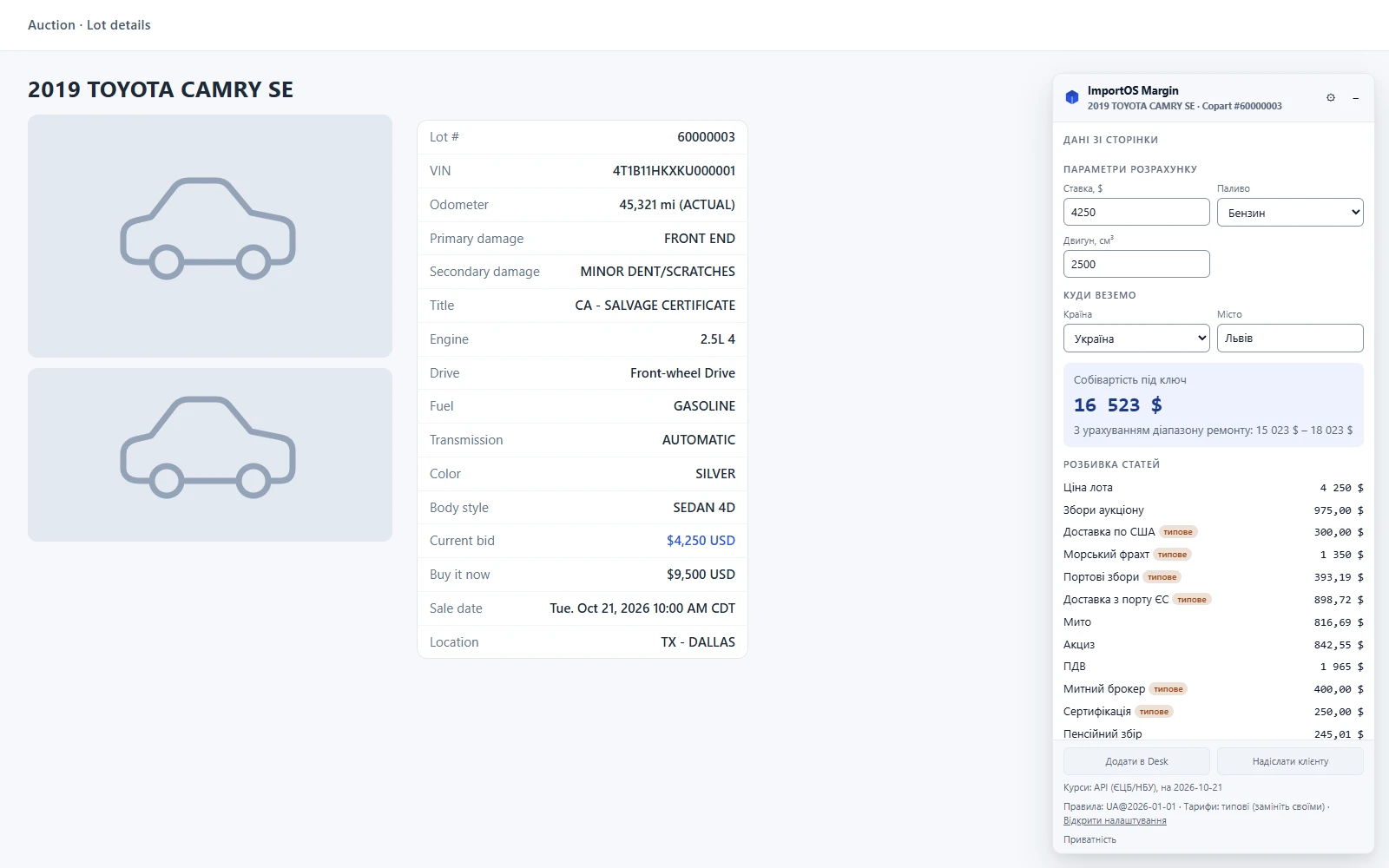
The ImportOS Margin extension (Chrome and Edge, Manifest V3) shows next to a Copart or IAAI lot page what the car will cost turnkey in your country (Ukraine, Poland, Lithuania, Georgia, Germany) and the maximum bid you can place while keeping the margin you need.
Safe mode: what the extension does and does not do
- It does not log in to sites, does not read cookies and does not bypass any protection.
- It makes no requests of its own to Copart or IAAI. It reads the page you have already opened under your own account.
- The only permission is
storage(settings). There is no broad site access: the script is injected only on lot and list pages. - All calculation is local. In the current version nothing is sent to a server and there is no analytics.
- Settings live in
chrome.storage.syncof your profile, small UI state (collapsed panel, your sale prices for up to 200 lots) inchrome.storage.local.
When the Desk integration arrives, only lot parameters (VIN, year, make and model, engine, damage, title, odometer, bid, yard) will be sent, only on your action, never the page HTML. The privacy policy will be updated first.
Installation
From the build folder (unpacked)
Available$env:Path = "$env:APPDATA\npm;$env:Path"
pnpm install
pnpm --filter @importos/margin-extension build # Chrome: .output/chrome-mv3
pnpm --filter @importos/margin-extension build:edge # Edge: .output/edge-mv3- Chrome:
chrome://extensions→ "Developer mode" → "Load unpacked" → folderimportos/apps/margin-extension/.output/chrome-mv3. - Edge:
edge://extensions→ "Load unpacked" → folder.output/edge-mv3.
From the store
Waiting on the ownerListing texts (uk, pl, en), the privacy policy and draft answers for the Chrome Web Store form are ready. What is missing are owner decisions: a Chrome Web Store developer account (one-time $5 fee), the privacy policy URL, the category and final screenshots. So there is no direct store link yet.
First run and settings
The settings page opens after installation.
FX rates. The extension does not download rates from the internet (that would need extra permissions). Enter them by hand: how many units of a currency per 1 USD, and the date. Ukraine needs EUR and UAH, Poland EUR and PLN, Georgia EUR and GEL. Without rates the panel honestly asks for them and calculates nothing. If the rates are stale, the panel warns you.
| Group | What is configured |
|---|---|
| General | language (uk, pl, en), panel theme (light, dark, system) |
| Destination | destination country and city, result currency |
| Fee and margin | fee model (none, fixed, percent of the bid), amount, minimum, target margin, thresholds "good" / "acceptable" / "risky" |
| Auction | bid channel (online, pre-bid, on site), payment (secured, unsecured) |
| Services and delivery | insurance, shipping type (by tariffs, container, RoRo), whether to include the repair estimate for damage, whether to include registration |
| Logistics tariffs | your overrides as JSON on top of the defaults |
| FX rates | manual rates and date |
Tariffs. The default tariffs are illustrative, not your prices, and the panel labels them "typical". Enter your own values as a JSON override on top of the defaults (for example {"brokerFee":{"amount":150,"currency":"USD"}}), tick "these tariffs are mine", and the warning goes away. Invalid JSON is rejected with an explanation and the defaults stay in force.
Margin thresholds by default: "good" from 15 %, "acceptable" from 8 %, "risky" from 0 %, below that is a loss or near zero. You can change them.
How to read the panel
- Page data: VIN, vehicle, engine, fuel, damage, title, odometer, current bid, Buy Now, sale date, yard. A dash means not found.
- Destination: country and city, changeable right in the panel.
- Calculation inputs: bid, engine (or battery for an EV), fuel. What the extension did not find you enter by hand. While something is missing, the panel says what and calculates nothing.
- Turnkey cost and the range including repair when there is damage.
- Item breakdown: lot price, auction fees, US inland transport, ocean freight, port, duty, excise, VAT, customs broker, certification, pension fund fee (Ukraine), registration, repair (estimate), insurance, your fee. Each item has "How it was calculated": an explanation, a formula and a source. Items whose rates are not confirmed by an official source are marked "unverified", typical tariffs are marked "typical".
- Margin and maximum bid. Enter the expected sale price. The sale price is entered by you: there is no market price in the extension. Without it the panel shows the minimum sale price for the target margin. With it: the margin, a verdict, confidence in percent and the maximum bid ($25 step). If even a $0 bid cannot reach the target margin, the panel says so.
- Warnings: title type (salvage, rebuilt, flood, non-repairable, bill of sale), water or fire, rollover, frame damage, unverified odometer, mentions of airbags and relist. Some warnings come from page text and must be checked on the lot itself.
- Rules and FX line: customs rules version, FX date, whether the tariffs are yours.
Result lists
On a list page every lot gets a margin badge: green (at or above "good"), yellow (between "acceptable" and "good"), red (below), gray (not enough data). Copart and IAAI cards usually have no engine or fuel, so in the list panel you set a reference sale price and assumed engine and fuel. The badge is calculated at the card's bid, and the assumptions are flagged in the tooltip.
When the page has changed
Auction sites change their markup from time to time. If the extension cannot read a lot reliably, it shows "Page has changed" and does not guess. The "Copy diagnostics" button copies only field names, the selectors version and the URL path, no page content. Send it to us.
Selector verification
Mandatory before publishing to the store
The Copart and IAAI adapter selectors and their fixtures are synthetic: written from memory of the markup and not checked against live pages (the sites serve an Incapsula check to unauthenticated requests). Only the owner can verify them, in a broker's session.
This is a task for a technical person. Steps:
- Build the unpacked extension, open a real Copart lot (then IAAI) and a results page.
- If the panel shows "page has changed" or the data is partly empty, press "Copy diagnostics".
- In DevTools find the real field elements: VIN, damage, title, bid, engine, yard.
- Update the selectors in one place, the adapter:
packages/sources/src/adapters/ua-us/copart/index.ts(data-uname="lotdetail*",lotsearchCard) or.../iaai/index.ts(.data-list__itemlabels,.bid-area). This code is shared with Scout and the health monitor. - If list cards or text blocks for airbags and relist changed, update the extension's
src/lib/selectors.ts, bumpSELECTORS_VERSIONand, after verification, setSELECTORS_VERIFIED = true. - Save anonymized snapshots of the real pages as new adapter fixtures (no VINs, names or phones) and set
meta.verified = true. - Run the tests:
pnpm --filter @core/sources test,pnpm --filter @importos/margin-extension test,pnpm --filter @importos/margin-extension test:e2e.
Also verify the URL patterns in src/lib/sites.ts. If a site works as an SPA and you reach a lot from the home page without a reload, the extension may not trigger. Then the patterns are widened to the whole domain, and the change is recorded in DECISIONS.md and in the privacy policy.
Known limitations
- "Add to Desk" and "Send to client" are disabled In development.
- No market price from the server; you enter the sale price In development.
- No server FX rates (NBU, ECB), only manual ones In development.
- Desk sign-in and syncing your tariffs with the tenant In development. The connection code in Desk (Settings → Extension) is already issued, but the current extension version does not accept it yet.