Desk: overview
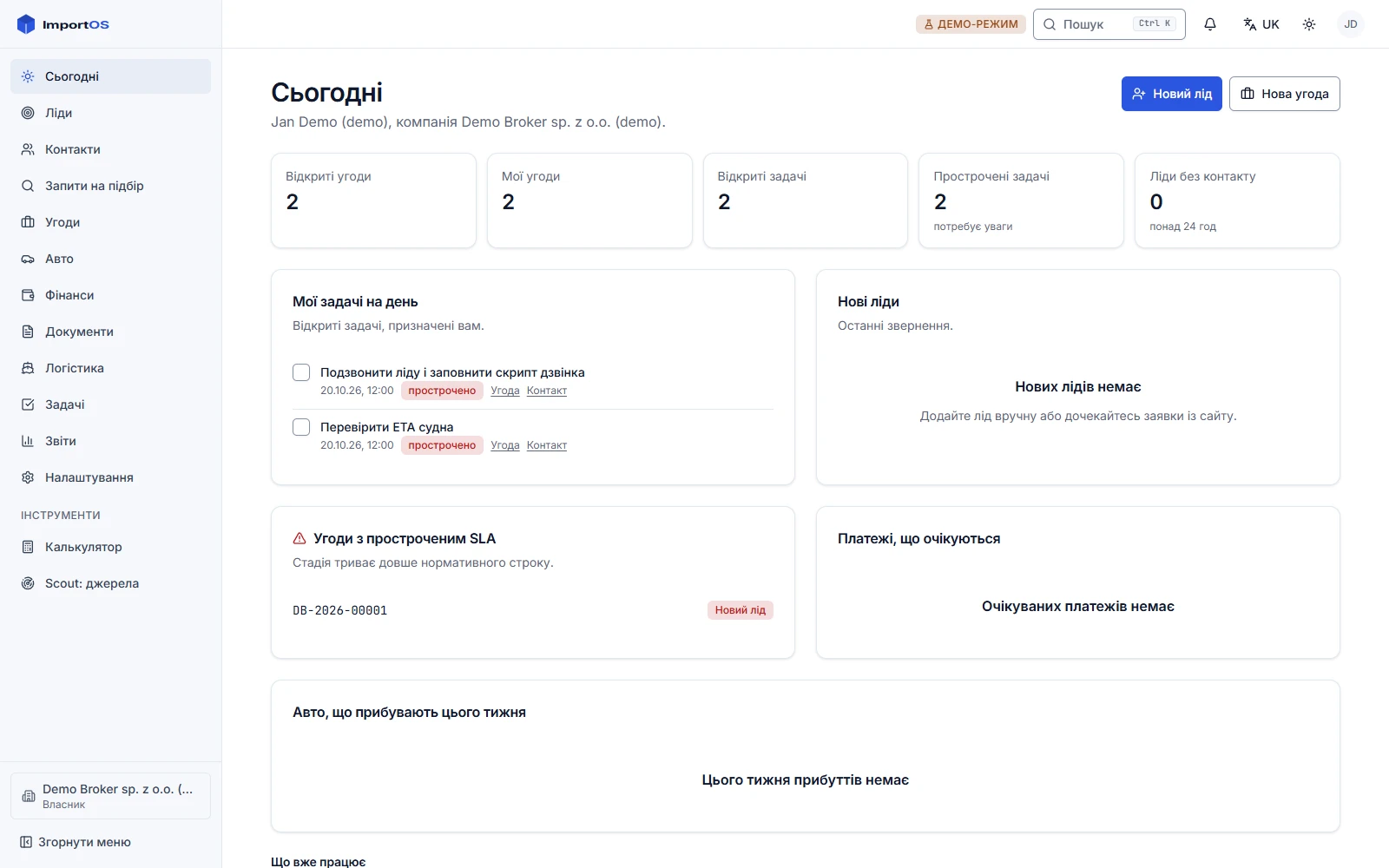
The broker's workspace: menu, shortcuts, roles, mobile. The state of each of the 13 sections comes from the Desk code.
Desk is the ImportOS CRM and admin. It is the workspace of the owner, the sales and sourcing manager, the accountant and the logistician. It is built to work from a phone as well as from a laptop: a manager is often on the road.
13 sections
The Desk menu has 13 sections. Each has its own page below. The state of a section (works or in development) is shown on its page and comes from the Desk code (nav.ts): when a section becomes ready, the documentation updates itself on the next build.
| # | Section | Page | Route |
|---|---|---|---|
| 1 | Today | Today | / |
| 2 | Leads | Leads | /leads |
| 3 | Contacts | Contacts | /contacts |
| 4 | Sourcing requests | Requests | /requests |
| 5 | Deals | Deals | /deals |
| 6 | Cars | Cars | /inventory |
| 7 | Finance | Finance | /finance |
| 8 | Documents | Documents | /documents |
| 9 | Logistics | Logistics | /logistics |
| 10 | Tasks and calendar | Tasks | /tasks |
| 11 | Reports | Reports | /reports |
| 12 | Settings | Settings | /settings |
| 13 | Super-admin | Super-admin | /admin |
Separately in the menu are the tools: Calculator and Scout.
Signing in
There are no passwords. You enter your email and receive a one-time link (valid for 15 minutes). If your email is in several companies, Desk asks which to enter, then gives a switcher in the sidebar. Step by step: quick start, step 3.
Roles and permissions
What you see in the menu depends on your role: a section you have no right to is hidden, not shown as unavailable.
| Role | Typical purpose |
|---|---|
owner | the owner: everything, including finance, margin and API keys |
manager | sales and sourcing manager: leads, clients, deals; no API key management |
accountant | accountant: contracts, invoices, payments |
logistics | logistician: shipping, containers, ports |
viewer | read-only |
Broker clients do not enter Desk; they have a cabinet. An attempt shows "No access".
Shell and conveniences
- A sidebar; on mobile a bottom navigation and a "More" sheet.
- Command palette:
Cmd/Ctrl+Kfor navigation and actions. Entity search (VIN, phone, deal number) through the palette is In development. - Keyboard help: press
?. Jump to a section:gand the section letter. - A notification bell In development: a place for real-time notifications.
- Interface language (uk, pl, en) and theme (light, dark, system) are changed in the profile.
- Installable on a phone as an app (PWA).
- A "demo mode" badge appears if some integrations run in mock mode (no real calls), see Settings → Integrations.