Settings
Profile, API keys, extension code, integrations; brand, team, stages, tariffs, templates, billing.
Available Route in Desk: /settings
What works now
| Sub-section | What it does | State |
|---|---|---|
| Profile | name, interface language (uk, pl, en), theme (light, dark, system) | Available |
| API keys | create, one-time reveal and revoke keys for the Data API and MCP | Available owner only |
| Extension | a one-time connection code for the Margin extension | Beta the code is issued, the extension does not accept it yet |
| Integrations | what works live and what in demo mode, which variables are needed | Available view only |
Profile
The theme is stored in this browser. A super-admin without a company changes the language only in the browser.
API keys
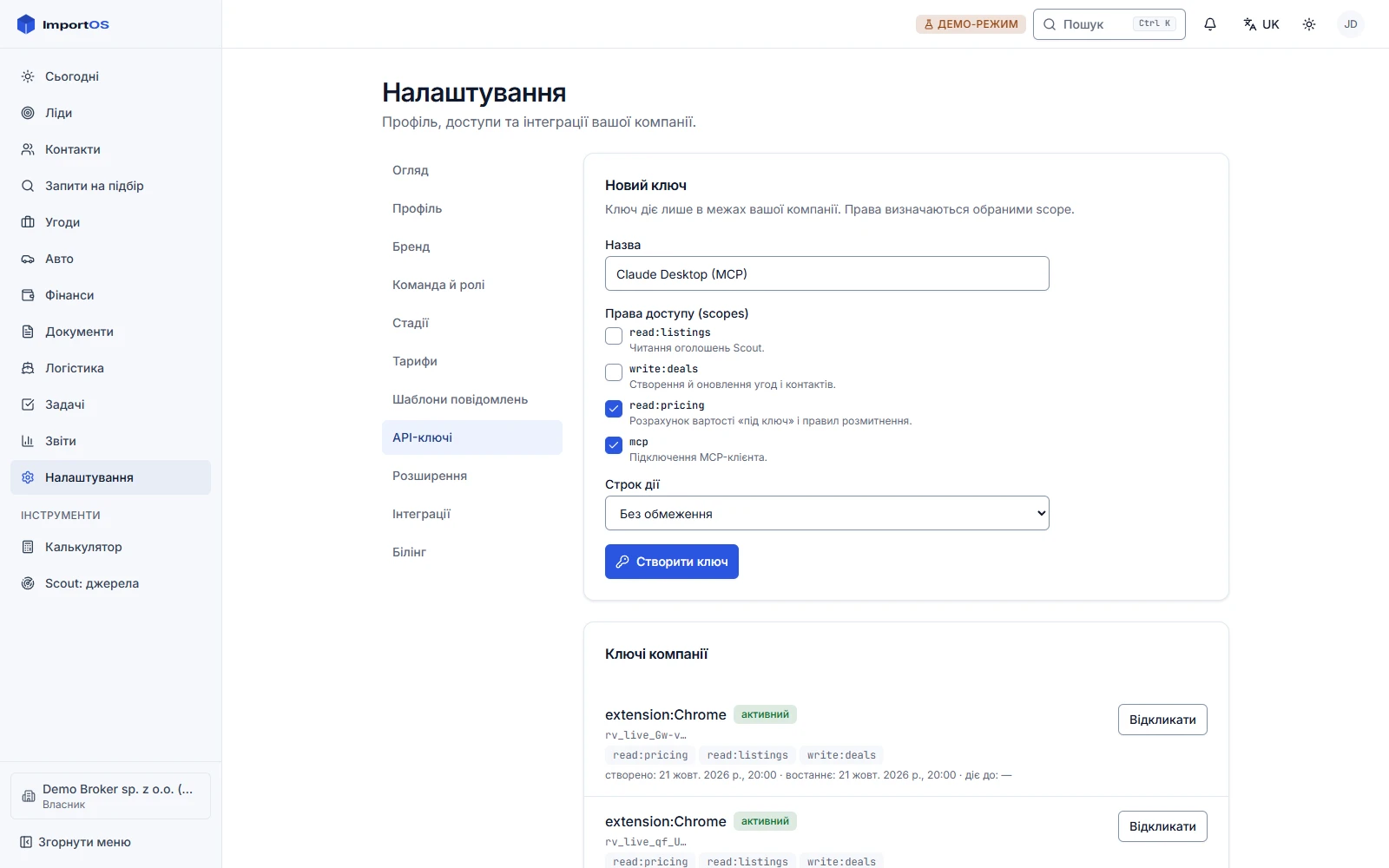
This is the sub-section needed for the developer scenario: API quick start. Only a company owner can create keys.
- Open "Settings → API keys".
- Enter a name (for example "MCP for Claude").
- Choose scopes:
read:pricingfor turnkey calculation and rules;read:listingsfor Scout listings and VIN;mcpto connect an MCP client;write:dealsto create and update deals and contacts (reserved for future endpoints). - Choose an expiry: none or a number of days.
- Press "Create key". The key is shown once: copy it right away, only a hash is stored.
- The list shows status (active, revoked, expired), creation date and last use. "Revoke" stops access immediately and irreversibly.
Extension
A side feature for the future binding of the extension to a company: "Generate code" creates a one-time code for 10 minutes. The current extension version calculates locally and does not wire up the code exchange yet.
Integrations
A table of platform integrations: FX rates, VIN, container tracking, payment providers, storage, Nova Poshta, maps. For each the mode (live, test, demo) and the missing environment variables (in yellow) are shown. Key values are never shown. The full catalog: Integrations.
What is coming
In development: tenant settings sub-sections
- Brand: logo, colors, tracking domain (Track). - Team and roles: inviting employees and distributing permissions. Accepting an invitation comes with the team service. - Deal stages: enabling and disabling, SLA, names for the client (stages). - Tariffs: service tariffs (fee model) and logistics tariffs for the calculator. - Message templates: texts for Telegram, Viber, SMS and email. - Company connections: Telegram bot, payment provider, ShipsGo, Google Sheets export. Management (view only now). - ImportOS subscription billing: plan, invoices, payment.